 Image 1 of 1
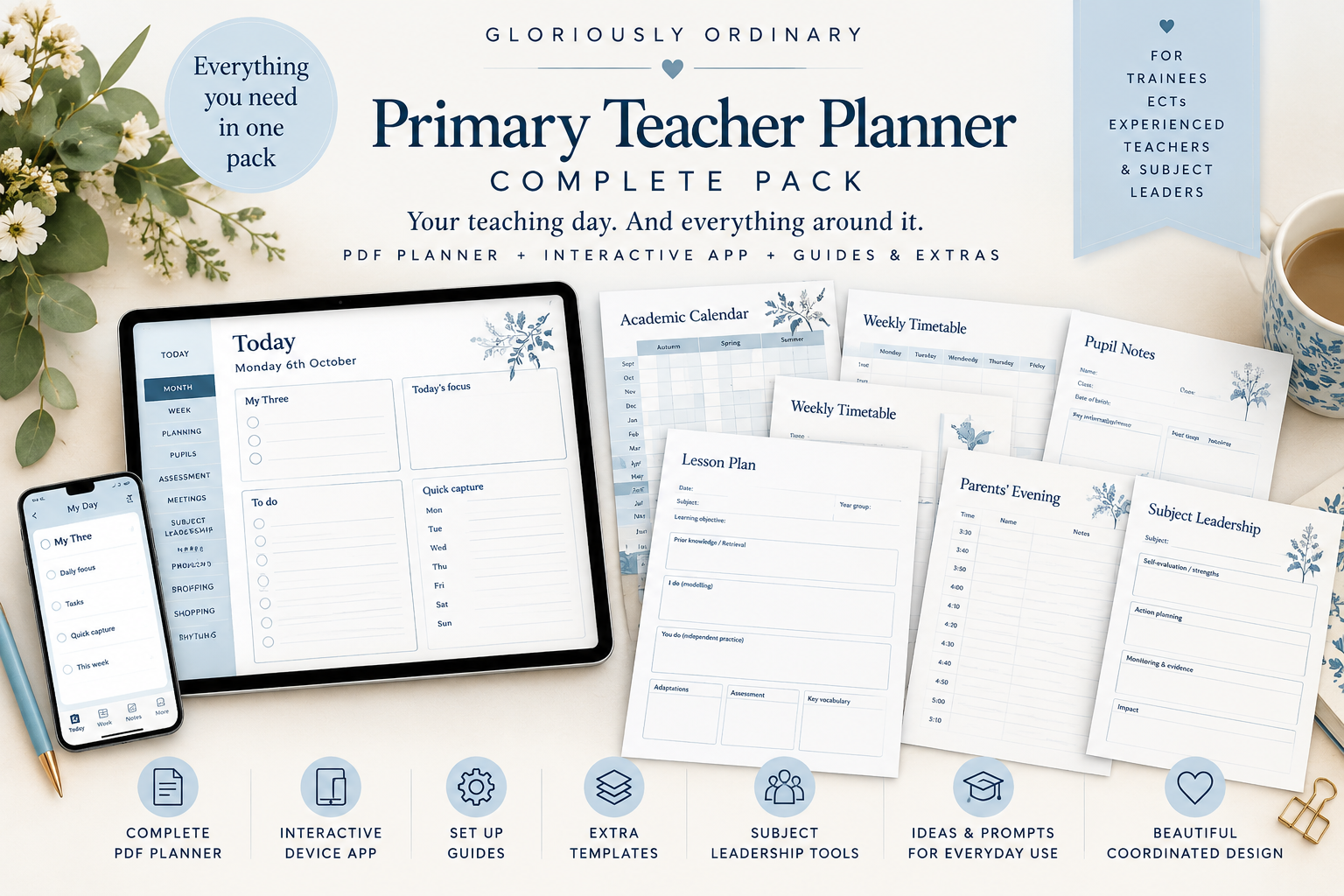
Gloriously Ordinary Primary Teacher Planner – Complete Pack
Your teaching day. And everything around it.
A thoughtfully designed, comprehensive digital planning system for primary school teachers, including Initial Teacher Training (ITT) trainees, Early Career Teachers (ECTs), experienced classroom practitioners and subject leaders.
The Gloriously Ordinary Primary Teacher Planner – Complete Pack combines a fully interactive digital planning app with two extensive PDF planners, additional editable recording sheets and practical guides.
Created in our signature Misty Blue colourway, this coordinated collection brings classroom organisation, curriculum planning, assessment, professional development and everyday teaching priorities together in one place.
Everything you need in one complete pack
Your purchase includes:
Interactive Device App – A digital planning system with editable records, dated tasks, searchable information, linked pupil records and additional sheets.
269-page Fillable PDF Planner – Type directly into editable fields, navigate between sections and populate linked pupil-name records.
269-page Handwriting and Printable PDF Planner – Write digitally using a compatible annotation application or print selected pages.
30 Additional Typed Sheets – Independently fillable pages for continued planning, assessment, meetings, pupil records and professional notes.
Six-page Customer Guide – Clear instructions for setting up, using, saving and backing up your planner.
Optional Desktop App File – An additional standalone version for compatible desktop browsers.
Licence and Reference Documents – Guidance on permitted use and included software licences.
Your download includes everything required to access the existing interactive app, including the website link and purchase code.
Inside your Teacher Planner
Today and daily organisation
Organise each teaching day around My Three priorities, daily focus, tasks, quick capture and the next practical steps.
Class setup and pupil information
Record information for up to 36 pupils, organise classroom routines and maintain linked individual pupil records.
Calendar and timetable
Plan your academic year using twelve undated monthly calendars, term overviews, important dates and a recurring weekly timetable.
Curriculum and lesson planning
Record long-term curriculum coverage, teaching sequences, learning intentions, retrieval, explanation and modelling, guided practice, independent application, assessment opportunities and lesson reflections.
Assessment and pupil progress
Monitor learning intentions, record assessment for learning, review individual and whole-class attainment, identify misconceptions, organise interventions and prepare progress discussions.
Meetings and family communication
Maintain records of professional meetings, coaching conversations, family communication and parents' evenings, with provision for 36 pupils.
Subject leadership
Use dedicated records for curriculum progression, monitoring, subject evaluation, action planning, staff support, evidence gathering and impact reviews.
Professional development
Capture observations, coaching discussions, professional targets, reflection and development priorities.
Celebrations and recognition
Record achievements, classroom celebrations, shout-outs and weekly certificates.
Wellbeing and notes
Create space for reflection, personal organisation and the everyday demands of professional life.
Three ways to use your planner
1. Interactive Device App
Use the interactive app for ongoing digital organisation, including dated and searchable records, recurring activities, linked pupil information and additional sheets.
Your entries are saved in encrypted local storage on your chosen device or browser, with protected backup and restore options.
An internet connection is required for initial access. Once installed and prepared for offline use, the app can also be used without a continuous internet connection.
The app does not automatically synchronise information between devices or with the PDF planners. You must keep your own protected backups.
2. Fillable PDF Planner
Prefer typing into structured planning sheets?
The 269-page fillable PDF allows you to enter information directly into editable boxes using a compatible PDF reader.
Pupil names entered during class setup repeat across relevant linked pages where supported by your PDF software.
The PDF does not automatically sort records, calculate assessment totals or transfer tasks between dates.
3. Handwriting and Printable Planner
Prefer to write by hand?
Use the 269-page handwriting edition with a compatible digital pen or PDF annotation application, or print the pages you need.
Handwriting does not automatically populate linked pupil records. Page duplication depends on your chosen PDF application.
Additional sheets included
The Complete Pack also contains thirty extra fillable pages for continued recording throughout the year.
Each supplied sheet has independently named editable fields, allowing information to be recorded separately without interfering with the original planner.
The additional sheets are supplied as a separate PDF. They do not automatically appear inside the main planner or synchronise with the interactive app.
Setting up your Complete Pack
Following purchase, download the ZIP file and open 00-OPEN-FIRST.pdf.
Your guide explains how to access the interactive app, enter the supplied purchase code, create your own device password, save and reopen records, and make protected backups.
It also provides instructions for opening, editing and saving both PDF editions on compatible devices.
No ChatGPT account or separate invitation email is required to use the supplied app access route.
Important product information
This is a digital product. No physical planner will be posted.
The Complete Pack is supplied for one teacher's professional use under the included licence.
Interactive app information is stored locally on the chosen device or browser. Clearing device storage, removing an installed app or losing access to a device may result in lost records unless you have retained a usable backup.
The PDF files are not automatically encrypted. Customers must use appropriate school-approved devices, applications and storage arrangements for pupil information and confidential professional records.
Features involving typing, handwriting, saving and page duplication depend on the compatibility of the chosen device and software. Customers should test their preferred setup using fictional information before entering real records.
Your purchase
£29.00 – One-time purchase
Your Complete Pack contains the interactive app access details, two 269-page PDF planners, thirty additional fillable sheets, the optional desktop file and comprehensive setup and licence documents.
For customer enquiries, please use the Contact page at www.gloriouslyordinary.co.uk/contact, quoting your order number. Do not send confidential pupil records or passwords.
Gloriously Ordinary is the trading name of Nicola Ball, a UK-based sole trader.
Your statutory consumer rights are unaffected.
Your teaching day. And everything around it.
A thoughtfully designed, comprehensive digital planning system for primary school teachers, including Initial Teacher Training (ITT) trainees, Early Career Teachers (ECTs), experienced classroom practitioners and subject leaders.
The Gloriously Ordinary Primary Teacher Planner – Complete Pack combines a fully interactive digital planning app with two extensive PDF planners, additional editable recording sheets and practical guides.
Created in our signature Misty Blue colourway, this coordinated collection brings classroom organisation, curriculum planning, assessment, professional development and everyday teaching priorities together in one place.
Everything you need in one complete pack
Your purchase includes:
Interactive Device App – A digital planning system with editable records, dated tasks, searchable information, linked pupil records and additional sheets.
269-page Fillable PDF Planner – Type directly into editable fields, navigate between sections and populate linked pupil-name records.
269-page Handwriting and Printable PDF Planner – Write digitally using a compatible annotation application or print selected pages.
30 Additional Typed Sheets – Independently fillable pages for continued planning, assessment, meetings, pupil records and professional notes.
Six-page Customer Guide – Clear instructions for setting up, using, saving and backing up your planner.
Optional Desktop App File – An additional standalone version for compatible desktop browsers.
Licence and Reference Documents – Guidance on permitted use and included software licences.
Your download includes everything required to access the existing interactive app, including the website link and purchase code.
Inside your Teacher Planner
Today and daily organisation
Organise each teaching day around My Three priorities, daily focus, tasks, quick capture and the next practical steps.
Class setup and pupil information
Record information for up to 36 pupils, organise classroom routines and maintain linked individual pupil records.
Calendar and timetable
Plan your academic year using twelve undated monthly calendars, term overviews, important dates and a recurring weekly timetable.
Curriculum and lesson planning
Record long-term curriculum coverage, teaching sequences, learning intentions, retrieval, explanation and modelling, guided practice, independent application, assessment opportunities and lesson reflections.
Assessment and pupil progress
Monitor learning intentions, record assessment for learning, review individual and whole-class attainment, identify misconceptions, organise interventions and prepare progress discussions.
Meetings and family communication
Maintain records of professional meetings, coaching conversations, family communication and parents' evenings, with provision for 36 pupils.
Subject leadership
Use dedicated records for curriculum progression, monitoring, subject evaluation, action planning, staff support, evidence gathering and impact reviews.
Professional development
Capture observations, coaching discussions, professional targets, reflection and development priorities.
Celebrations and recognition
Record achievements, classroom celebrations, shout-outs and weekly certificates.
Wellbeing and notes
Create space for reflection, personal organisation and the everyday demands of professional life.
Three ways to use your planner
1. Interactive Device App
Use the interactive app for ongoing digital organisation, including dated and searchable records, recurring activities, linked pupil information and additional sheets.
Your entries are saved in encrypted local storage on your chosen device or browser, with protected backup and restore options.
An internet connection is required for initial access. Once installed and prepared for offline use, the app can also be used without a continuous internet connection.
The app does not automatically synchronise information between devices or with the PDF planners. You must keep your own protected backups.
2. Fillable PDF Planner
Prefer typing into structured planning sheets?
The 269-page fillable PDF allows you to enter information directly into editable boxes using a compatible PDF reader.
Pupil names entered during class setup repeat across relevant linked pages where supported by your PDF software.
The PDF does not automatically sort records, calculate assessment totals or transfer tasks between dates.
3. Handwriting and Printable Planner
Prefer to write by hand?
Use the 269-page handwriting edition with a compatible digital pen or PDF annotation application, or print the pages you need.
Handwriting does not automatically populate linked pupil records. Page duplication depends on your chosen PDF application.
Additional sheets included
The Complete Pack also contains thirty extra fillable pages for continued recording throughout the year.
Each supplied sheet has independently named editable fields, allowing information to be recorded separately without interfering with the original planner.
The additional sheets are supplied as a separate PDF. They do not automatically appear inside the main planner or synchronise with the interactive app.
Setting up your Complete Pack
Following purchase, download the ZIP file and open 00-OPEN-FIRST.pdf.
Your guide explains how to access the interactive app, enter the supplied purchase code, create your own device password, save and reopen records, and make protected backups.
It also provides instructions for opening, editing and saving both PDF editions on compatible devices.
No ChatGPT account or separate invitation email is required to use the supplied app access route.
Important product information
This is a digital product. No physical planner will be posted.
The Complete Pack is supplied for one teacher's professional use under the included licence.
Interactive app information is stored locally on the chosen device or browser. Clearing device storage, removing an installed app or losing access to a device may result in lost records unless you have retained a usable backup.
The PDF files are not automatically encrypted. Customers must use appropriate school-approved devices, applications and storage arrangements for pupil information and confidential professional records.
Features involving typing, handwriting, saving and page duplication depend on the compatibility of the chosen device and software. Customers should test their preferred setup using fictional information before entering real records.
Your purchase
£29.00 – One-time purchase
Your Complete Pack contains the interactive app access details, two 269-page PDF planners, thirty additional fillable sheets, the optional desktop file and comprehensive setup and licence documents.
For customer enquiries, please use the Contact page at www.gloriouslyordinary.co.uk/contact, quoting your order number. Do not send confidential pupil records or passwords.
Gloriously Ordinary is the trading name of Nicola Ball, a UK-based sole trader.
Your statutory consumer rights are unaffected.